
Snaptik is a free TikTok video downloader. Simply copy your TikTok video link from the app and paste it into the box at the top of this page, and your TikTok video is downloaded in seconds. Snaptik is completely free to use, with no app and no account, and every video comes with no watermark. Think of it as a TikTok saver, if you like: a quick way to download TikTok video files in their original quality, keep the soundtrack as an MP3 and grab the cover image, on a phone or a computer.
How to download TikTok video
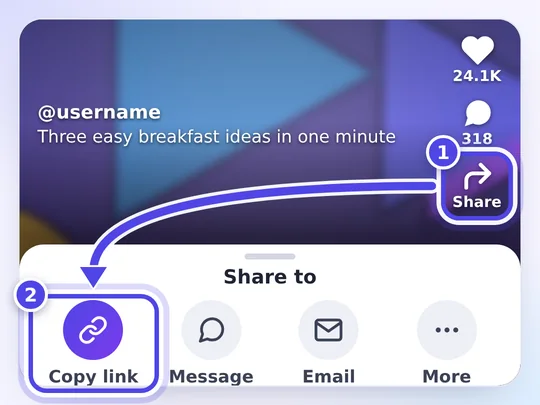
- Open TikTok. Tap the Share button, then the Copy link option.
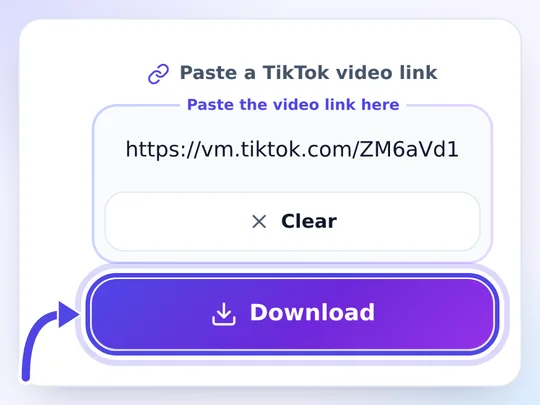
- Paste the link into Snaptik and tap Download.
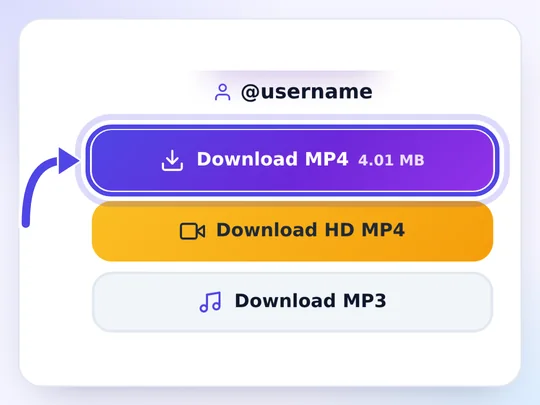
- Choose MP4, HD MP4 or MP3, and save the file.
This is the fastest way to download TikTok videos, and the illustrated steps below show each tap. Whether you type download video TikTok, TikTok download video or video download TikTok into a search box, you are after the same thing: a clean copy of a clip, and Snaptik gets it for you in three taps.
Links from the app look like vm.tiktok.com/…, while links from the website look like tiktok.com/@name/video/…; Snaptik accepts both. For photo posts, slideshows, sounds and stories, our slideshow downloader, TikTok to MP3 converter and story viewer are a better fit, and the complete guide to using snaptik.cat covers every tool.
TikTok without watermark, in HD
All of your videos come with no watermark. There is no animated logo, and the creator's username is not stamped over the picture. If you need the highest quality, choose HD MP4: Snaptik acts as a TikTok downloader without watermark and keeps the full resolution, so the clip looks clean when you share it or use it in an edit.
Why does that matter? When you use TikTok's own Save video option, the app adds a moving logo and the creator's username on top of the picture, and the logo jumps between corners while the video plays. That is fine for a quick share, but it gets in the way when you want to watch a clip on a large screen, keep a tidy archive of your own videos or use your own footage in an editing app. On a TV or a laptop, TikTok without watermark simply looks better: nothing covers the picture.
Snaptik as a TikTok watermark remover
Many people look for a TikTok watermark remover once they notice the animated logo on their saved videos. Snaptik does not blur, crop or cut out any part of your video. It simply downloads the original version of the file, the one that exists before the watermark TikTok adds is put on top. This is the easiest way to download TikTok video without watermark and without losing quality: no AI cleanup and no re-encoding, just the clean file at its original size. Our TikTok watermark remover page explains what disappears and what stays.
Removing the logo does not remove the creator's rights, though. When you share a video, credit the person who made it.

Convert TikTok to MP4 or MP3
Convert TikTok to MP4 so you can watch offline, or just download the audio as MP3. Both options are shown on the result card, next to the HD file and the cover. Here is what each button gives you:
| Button | What you get | Good for |
|---|---|---|
| Download MP4 | The clean video in standard quality, as a smaller file | Older phones, quick sharing, saving space |
| Download HD MP4 | The highest resolution TikTok stores for that post | Big screens, editing, keeping the best copy |
| Download MP3 | The soundtrack of the video as an audio file | Music players, voice notes, ringtones |
| Download cover | The thumbnail of the post as an image | Thumbnails, references, collections |
Strictly speaking, nothing is converted: the video is saved in the MP4 format TikTok already uses, so no quality is lost on the way. HD files are prepared on request: the first tap gets the file ready, and once the button turns green, a second tap saves it.
TikTok downloader HD: the limits of HD quality
HD on Snaptik means the best version TikTok keeps for that post, usually 1080p for clips filmed on a recent phone and 720p for many others. That copy is handed to you as it is, and a few things follow from it:
- No upscaling. A 720p upload stays 720p, and a shaky or blurry clip stays shaky or blurry; HD cannot add detail the camera never captured.
- No second round of compression. You get TikTok's stored file, not a re-encoded copy of it.
- Bigger files. The HD version is noticeably larger than the standard MP4, so it takes longer on a slow mobile connection.
- Not every post has it. When TikTok keeps only one quality, Snaptik says so, and the regular MP4 is already the best copy.
Save TikTok video on iPhone, Android and PC
You can save TikTok videos onto any device with a browser: iPhone (Safari), Android (Chrome) and Windows or Mac (any browser). The steps to download from TikTok are the same everywhere; only the place where the file ends up changes.
iPhone and iPad
Use Safari. After you tap a download button, the video lands in the Files app, inside Downloads. Open it there, tap the share icon and pick Save Video; the clip then appears in your photo library.
Android
Chrome, Samsung Internet, Firefox and other browsers save the file to the Downloads folder. Most gallery apps, including Google Photos, show it a moment later.
Windows, Mac and Chromebook
Copy the link from tiktok.com or send it from your phone, then paste it into Snaptik in any browser. The video goes to your browser's download folder; press Ctrl+J on Windows and Chromebook, or Option+Command+L in Safari on a Mac, to open the list of downloads.
Starting on a computer but want the video on your phone? Every result has a Send to phone (QR) button: scan the code and snaptik.cat opens on your phone with the same link already filled in.
What is TikTok?
TikTok is a short-form video platform owned by the Chinese technology company ByteDance. Its videos are vertical, made to fill a phone screen, and usually run from a few seconds to a few minutes, set to music, a voice-over or the creator's own sound. In August 2018 ByteDance merged Musical.ly, the lip-sync app it had bought the year before, into TikTok, and the combined app grew into one of the most widely used social platforms in the world.
Most of the watching happens in the For You feed, an endless stream of clips chosen by TikTok's recommendation system from what you watch, like and share. The feed moves fast, so a clip you enjoyed an hour ago can be surprisingly hard to find again. A TikTok downloader solves that: it turns the clip into a file that stays on your device.
Why people save TikTok videos
A downloaded video plays anywhere, at any time, without loading the app or using mobile data again. People keep TikTok clips for many everyday reasons:
- Offline viewing on a flight, on the subway or anywhere the signal is weak.
- Recipes, workouts and tutorials you want to follow step by step, pausing as often as you like.
- A backup of your own posts, in case you change phones, lose access to your account or delete a clip.
- Saving data: a file stored once can be watched again and again without streaming it each time.
- Personal projects such as a birthday montage or a school presentation, with the creator's permission.
Is Snaptik a safe TikTok downloader?
Snaptik is a website, not an app: you install nothing, and nothing keeps running on your device once the tab is closed. You never sign in, and we never ask for your TikTok password: a public link is all the tool needs. Videos are fetched from TikTok and relayed through our download servers straight to your device. We do not keep a library of what you save, and we do not link the links you paste to you. Our privacy policy lists the few preferences stored in your browser and the cookies used for analytics and ads.
About those ads: your first tap on a download button also brings up an advertiser's page in a separate tab. Close it and return here – the same tap has already started your file. Ads are what keep Snaptik free for everyone.
Respect the creators
Every TikTok video belongs to the person who made it. Snaptik is meant for personal, offline viewing of public content, so please follow a few simple rules:
- Keep downloads for yourself and watch them offline.
- Do not re-upload, redistribute or monetize other people's videos, and do not edit them without permission.
- Credit the creator whenever you show a clip to others.
- Private videos and accounts are off limits; Snaptik only works with public posts.
If you made a video and do not want it to be downloadable here, send us the links via the contact page. Every request is reviewed, and confirmed content is blocked within 72 hours. The full rules are in our terms of use.
Is it legal to download TikTok videos?
There is no single answer for the whole world, because copyright rules differ from country to country. Two things hold almost everywhere, though. First, the video stays the property of the person who made it, even after you save a copy. Second, what you do with the file matters more than the download itself: watching a public clip offline on your own device is the use Snaptik is built for, while posting it again as if it were yours, selling it or using it in an advert needs the creator's permission.
TikTok's own rules point the same way: creators decide whether others may save their posts, and they keep the rights to their work. If you want to share or reuse a clip, the simplest route is to ask the creator and credit them. This section is general information, not legal advice; for business use, check the law where you live.
TikTok downloader options compared
There is more than one way to keep a TikTok. Here is how the common methods differ, so you can pick the one that suits the moment:
| Method | Watermark | Quality | Set-up |
|---|---|---|---|
| TikTok's own Save video | Logo and username added | Standard | In the app; only works if the creator allows saving |
| Screen recording | Records the app's buttons and captions too | Limited to your screen | Built into most phones |
| Downloader apps | Depends on the app | Depends on the app | Install, often with extra permissions and ads |
| Browser extensions | Depends on the extension | Depends on the extension | Desktop only, with access to the pages you visit |
| Snaptik | None | HD when the post has it, standard MP4 otherwise | Nothing to install, no account |
If the creator allows saving and the logo does not bother you, TikTok's own button is perfectly fine for a quick copy. Snaptik is the better choice when you want a clean file, the best quality available, the sound on its own or the pictures of a photo post, and when you would rather not install anything.
Troubleshooting: when a TikTok video won't download
The link is wrong or incomplete
Copy the link again from the Share menu and make sure it starts with https://. A profile link (tiktok.com/@name) opens a profile, not a video; use the profile viewer for that.
The video is private, deleted or region-locked
Snaptik can only reach videos that anyone can watch without logging in. Posts that are private, shared with friends only, removed or blocked in some countries cannot be downloaded. If a link opens fine in a browser and still fails here, wait a minute and try again; TikTok sometimes limits requests for a short time.
HD did not start downloading
That is expected: the first tap prepares the HD file, and a second tap on the green button saves it.
I can't find the file
Look in the Files app on iPhone and iPad, or in the Downloads folder on Android and computers. Your browser's download list always shows where the last file went.
HD is not available for a video
Not every post has an HD version. If the creator uploaded in standard quality only, Snaptik tells you so, and the regular MP4 is the best copy that exists.
Start saving your favorite TikToks
That is all there is to it: copy a link, paste it into the download box at the top of the page and keep the clip with no watermark. Bookmark snaptik.cat or add it to your home screen, and your next download is one tap away.