
Snaptik works as a TikTok watermark remover that never touches the picture. Instead of blurring the bouncing logo, it saves the original file that TikTok keeps before the watermark is added, so you get the whole frame, the full quality and no username in the corner. Paste a link in the box above, tap Download and the clean video is yours in a few seconds, on any phone or computer.
What is the TikTok watermark?
When a video is saved with the app's own Save video button, TikTok stamps two things on it: its music-note logo and the creator's @username. The pair does not stay still. It sits in one corner for the first part of the clip and then jumps to another, so cropping one edge never gets rid of it. Many saved videos also finish with a short branded end screen that shows the logo and the username once more.
The idea behind the mark is fair: it tells everyone where a clip came from and who made it. It becomes a nuisance when you simply want to rewatch your favourite moments on a television, keep a neat archive of your own uploads or drop your own footage into an editing app. That is why so many people look for TikTok without watermark. Searches such as "TikTok no watermark" are typed into search boxes every day.
How Snaptik removes the watermark
Strictly speaking, Snaptik does not remove anything. Every public post exists on TikTok's servers in a clean form, the file the creator uploaded, and the logo is laid on top only when someone saves the clip through the app. Snaptik asks for that clean file directly. Because nothing is erased, there is nothing to repair: no smudged corner, no stretched picture and no AI guesswork filling the gap.
This is also why the result looks better than what most watermark remover apps deliver. Tools that work on an already watermarked copy have to hide the logo after the fact, and each hiding trick leaves a trace:
| Method | What happens to the picture | Quality |
|---|---|---|
| Blur or smudge tool | A soft patch stays where the logo was, and it moves when the logo moves | Lower, re-encoded |
| Cropping | Edges are cut off, and the logo still shows when it jumps to the other corner | Lower, smaller frame |
| AI object removal | The gap is filled with guessed pixels that often flicker | Varies, slow on long clips |
| Screen recording | Records the app's buttons, captions and the logo as well | Limited to your screen |
| Snaptik | Untouched: the clean original was never marked | Original, HD when available |
How to remove the watermark from a TikTok video
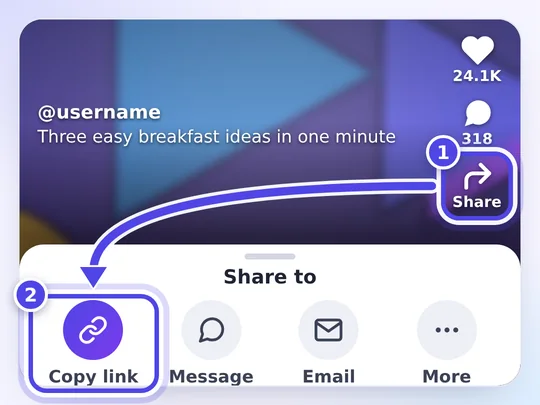
- Find the clip in TikTok, tap Share and pick Copy link.
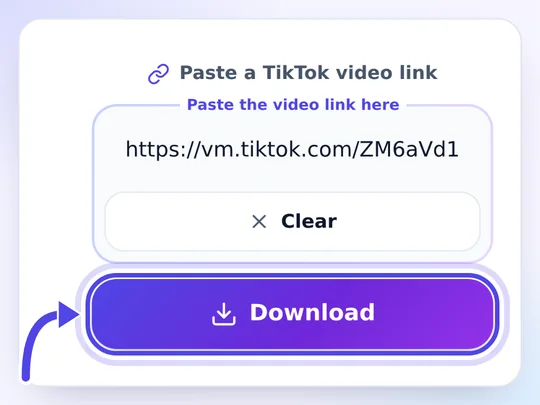
- Open this page, paste the link into the box at the top and tap Download.
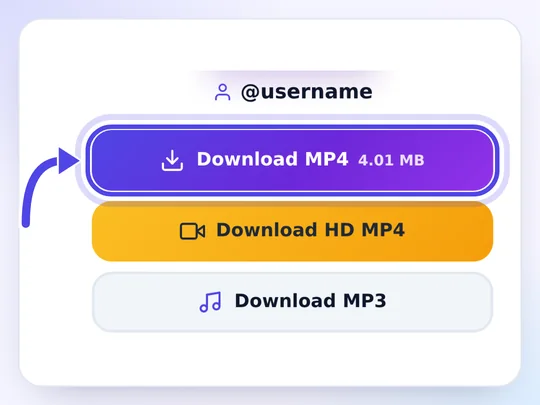
- Choose Download HD MP4 for the sharpest copy, or Download MP4 for a smaller file.
That is the whole job: there is no editing screen, no timeline and nothing to brush over. If you would rather start from the main page, the Snaptik TikTok video downloader gives you exactly the same clean files, plus the MP3 and the cover.
Keep HD quality without the logo
Watermark removal and quality usually pull in opposite directions, because every edit means saving the video again and losing a little detail. Here the two do not conflict. Snaptik works as a TikTok downloader without watermark and without a second round of compression: the HD button gives you the highest resolution TikTok keeps for that post, usually 1080p for clips shot on a recent phone and 720p for many others. A clip that was uploaded in low quality stays that way; no tool can add detail the camera never captured.
What this tool cannot remove
Only the mark that TikTok adds is missing from the clean file. Anything the creator put into the video before uploading belongs to the clip itself and stays visible:
- Captions, stickers, emojis and text typed in TikTok's editor.
- A creator's own logo or channel name burned into the footage.
- Watermarks from other apps, such as a CapCut template mark or a reposted clip that already carries another platform's logo.
- The watermark on videos that are private, friends-only or deleted, because those cannot be downloaded at all.
Photos and slideshows without the logo
Photo posts do not get the moving logo, but pictures saved from the app are often smaller and more compressed than the originals. To keep every picture of a photo post at its original size, use the TikTok photo downloader; for a swipeable post that you want as single images or as one video with its music, the slideshow downloader is the better fit.
Removing the watermark and creators' rights
A clean file is still the creator's work. Taking off the logo is perfectly reasonable for watching offline, for backing up your own posts or for editing your own footage. It is not a licence to repost someone else's video as your own: without the logo, a reupload can look like theft of credit, and it may break copyright law and TikTok's rules. If you share a clip, name the person who made it, and ask before you reuse it in your own content. Rules differ by country, so treat this as general information rather than legal advice.